

How to Redeem a Roblox Gift Card Code: The Complete Guide
Redeeming a Roblox Gift Card (Gift Card) code is very simple. In this step-by-step guide, we will show you how to use your PIN code, purchased on 1RBX, on the official Roblox website.

Step-by-Step Guide: How to Redeem a Roblox Code
The redemption process takes less than a minute. Please follow these steps using only the official Roblox website:
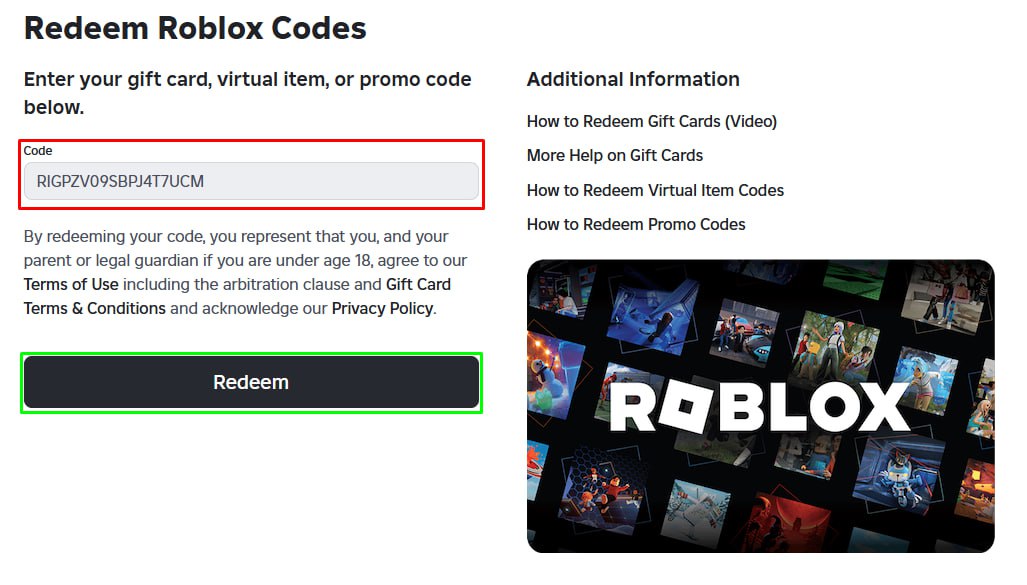
- Step 1. Go to the official redemption page: roblox.com/redeem.
- Step 2. Log in to the Roblox account where you want to add the funds.
- Step 3. Find your PIN code. If purchased from us, it is located in your 1RBX Dashboard (tab "Gift Storage" -> "Gift Cards").
- Step 4. Enter the PIN into the "Code" field and click the green "Redeem" button.
- Step 5. Success! You will see a confirmation message, and your Roblox Credit balance will be updated immediately.
What Do I Get After Redemption?
Important note: A Gift Card does not add Robux directly. Instead, you receive "Roblox Credit" — a real money balance in the card's currency (e.g., $10, $25).
This credit never expires. You can use it immediately to buy Robux or a Premium subscription directly on the Roblox site. This is often better value than buying Robux directly.
Code Not Working? Troubleshooting
If you encounter an error during activation, check these common issues first:
1. Typos in the code.
Ensure you entered the code correctly. Users often confuse the digit 0 (zero) with the letter O, or the digit 1 (one) with the letter I. It is best to copy and paste the code directly from 1RBX.
2. Wrong Account.
Check the top right corner of the screen — are you logged into the correct Roblox account?
3. Issue with the Code.
If you are sure everything is correct but the code is invalid, contact our support chat immediately. (Remember: according to store policy, you must redeem the code within 1 hour of purchase).
Still need
help?
Our support team is ready to assist you with any questions or issues you may have