

Return
Password Authentication Process for the Account
To use a password to log in to your account, you must first create one. Our guide will help you set it up step by step:

Guide: How to Set a Password for Easy Login?
Logging in with a password is the fastest way to access your Dashboard without needing to verify via Gamepass every time. It only takes a minute to set up. Follow the steps below:
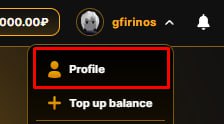
- Step 1. Go to Profile.
First, ensure you have logged in via Gamepass at least once. Once inside, click on your avatar or username to open your Dashboard.
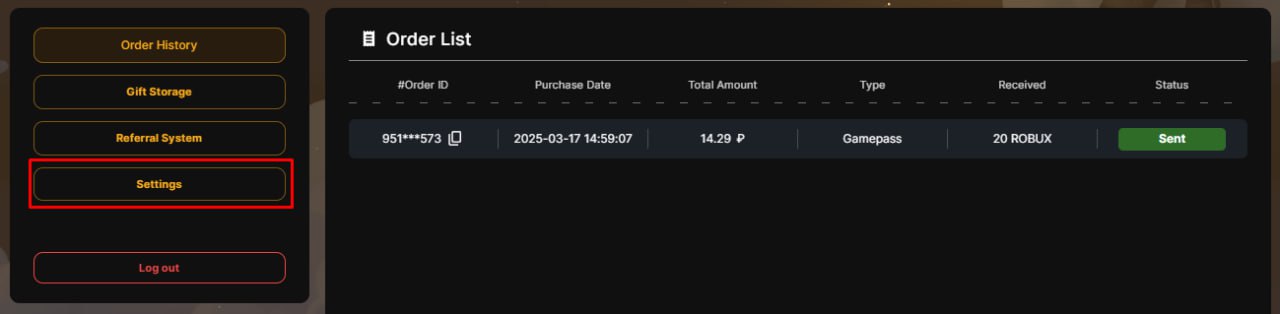
- Step 2. Open Settings.
In the sidebar navigation menu, find and click on the "Settings" tab.
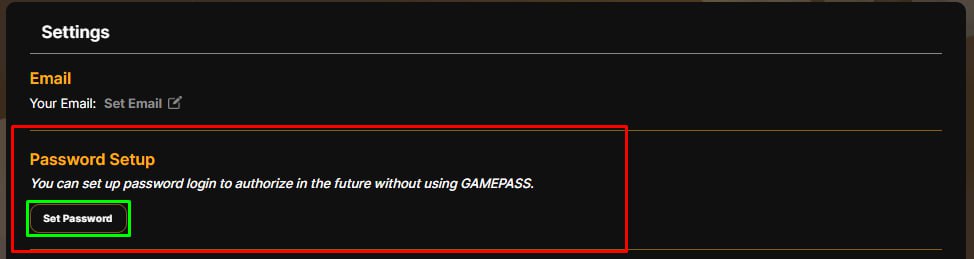
- Step 3. Choose Password Option.
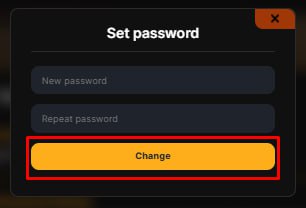
Scroll down to the security section. Find the "Password Setup" field and click the "Set Password" button.
- Step 4. Enter and Save.
In the popup window, create a secure password. Enter it twice (in the confirmation field) and click "Save". You can now log in using just your username and this new password!
Please note: The initial login to 1RBX must always be done via GamePass to verify account ownership. The password option becomes available only after you are logged in!
Still need
help?
Our support team is ready to assist you with any questions or issues you may have
Chat with us