

Return
How to Top Up Your Balance on 1RBX.SHOP?
A detailed guide for all available payment methods. We support 100+ convenient payment options, from bank cards to e-wallets.

The 1RBX.SHOP balance is your all-in-one account wallet. Top it up to instantly pay for any service on our site: buy Robux via Gamepass, order Gift Cards, or purchase Items on the Market.
Guide: How to Top Up Your Balance (Deposit Funds)
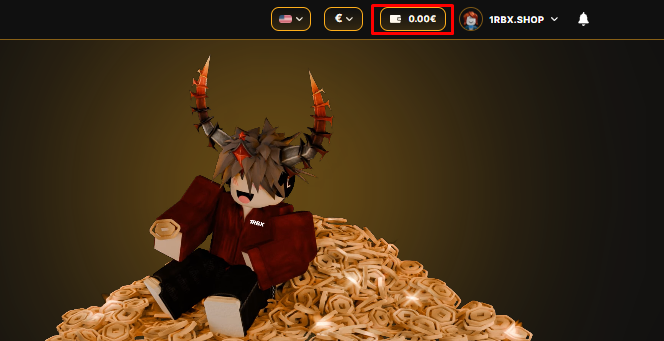
- Step 1. Log in to your account. Click on the Wallet icon located next to your profile picture.
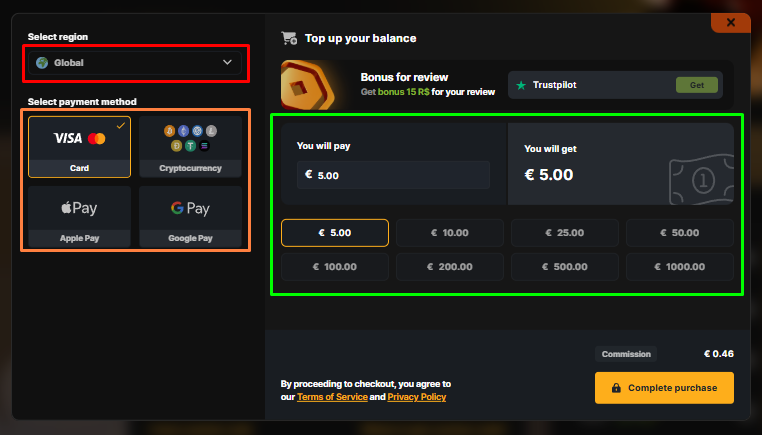
- Step 2. In the payment window, select your Region (left side) and preferred Payment Method (Card, Crypto, etc.). Then, click the button with the desired top-up amount.
Have questions about transactions? Read more about payment methods and troubleshooting.
- Step 3. Carefully review the information on the screen. Once ready, click the "Complete Purchase" button.
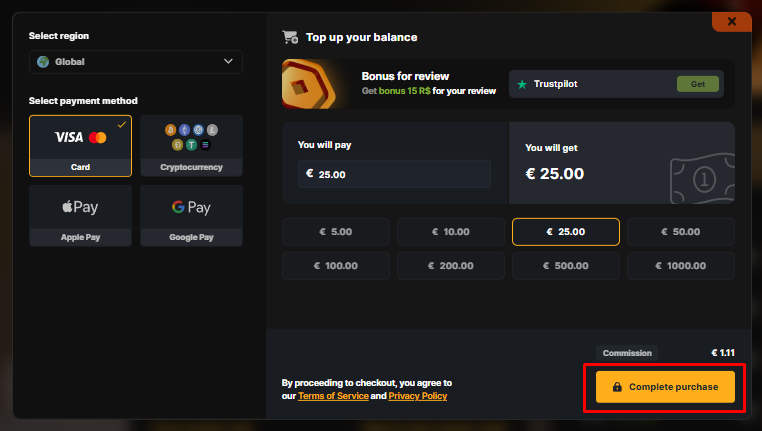
- Step 4. Follow the instructions on the payment provider's screen to finalize the transfer.
- Step 5. Done! Use your new balance to buy Robux, Gift Cards, or Marketplace Items immediately!
Still need
help?
Our support team is ready to assist you with any questions or issues you may have
Chat with us