Where to Find Your Gift Card After Purchase?
In this article, we explain exactly where to find your purchased Roblox gift card code in your 1RBX account, and what to do if it doesn't appear immediately.

Where to Find Your Gift Card Code in the Dashboard?
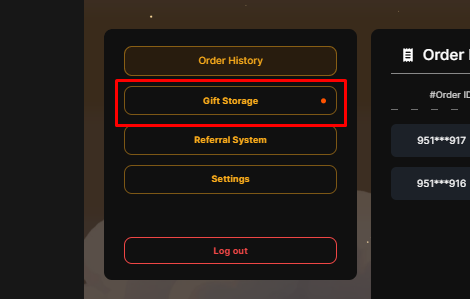
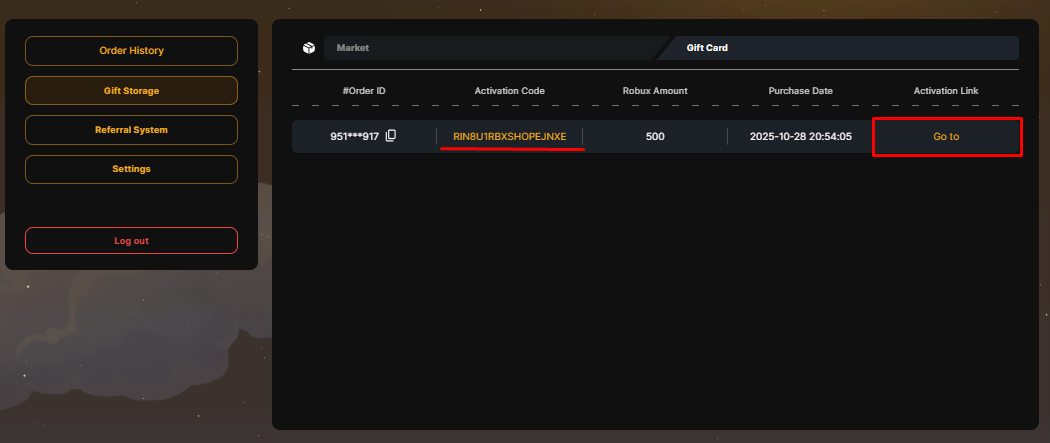
After a successful payment, your unique PIN code is instantly saved in your purchase history. You don't need to wait for an email — the code is already waiting for you in your 1RBX Personal Account.
To retrieve your code, follow these 2 simple steps:
- Step 1. Go to your profile (Dashboard) and open the "Gift Storage" tab.
- Step 2. Select the "Gift Cards" section from the list. Your code will be displayed there.
What Does "Coming Soon" Status Mean?
Sometimes you might see the status "Coming Soon" instead of the code. Do not worry. This means your order is in the final stage of automated processing.
Typically, the code will appear in your profile within 1 hour. Delays may occur during high traffic, but our team ensures every customer receives their item as fast as possible!
I Have the Code, What Next?
Once you have the code, you can redeem it immediately. We have prepared a detailed guide for you.
Still need
help?
Our support team is ready to assist you with any questions or issues you may have